
Win more bids.
Write them faster.
BOXBid is a bid writing workspace for UK public sector tenders. Upload the tender the buyer sent, whether an ITT, PQQ or RFP. BOXBid pulls out every question, drafts answers from your own past work, and checks them against the scoring criteria before you submit.
30 days free. No card needed. Your data and AI processing stay in the UK.

Most AI bid tools assume clean PDFs. Real tenders don’t work like that.
BOXBid reads what UK buyers actually send and turns it into a list of questions your team can start on the same day.
What the buyer sends
- Tables nested inside tables
- Text boxes and embedded layouts
- Scanned appendices with no selectable text
- Templated, inconsistent formatting
- Frameworks split into several lots
What BOXBid gives you
- Every question, in the order the buyer asked it
- Section numbers, word limits and weightings captured
- Each question assignable to a person, or a whole lot to a lead
- An honest “we couldn’t read this file” when that is the truth
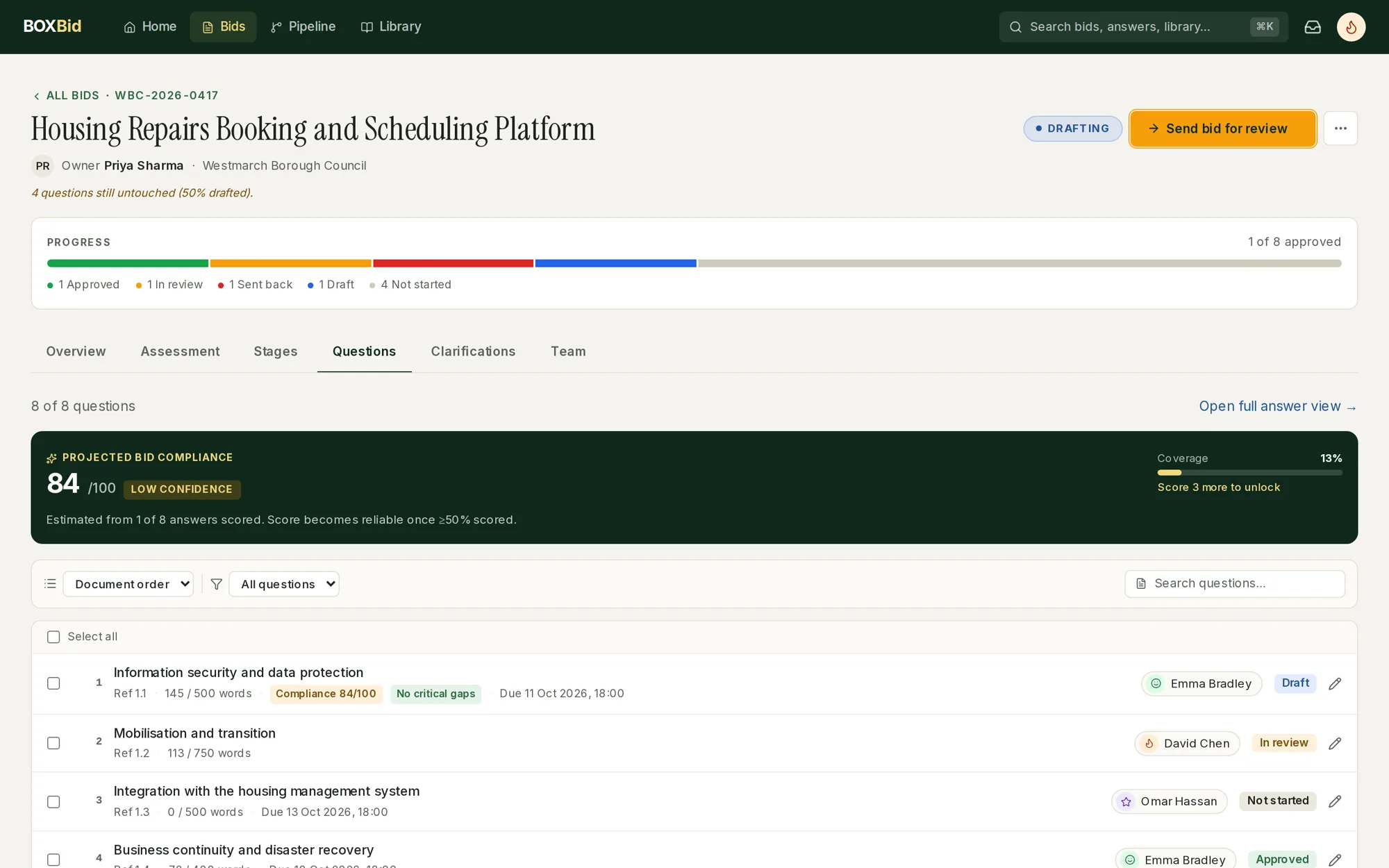
Every question, owned and on a date
Upload the tender and BOXBid lists every question with its reference, word limit and weighting. Give each one an owner and a due date. The colours mean the same thing on every screen: blue is a draft, amber is in review, red has been sent back, green is approved.
- Assign a question to a colleague or an outside expert
- See what is unassigned, overdue or sent back at a glance
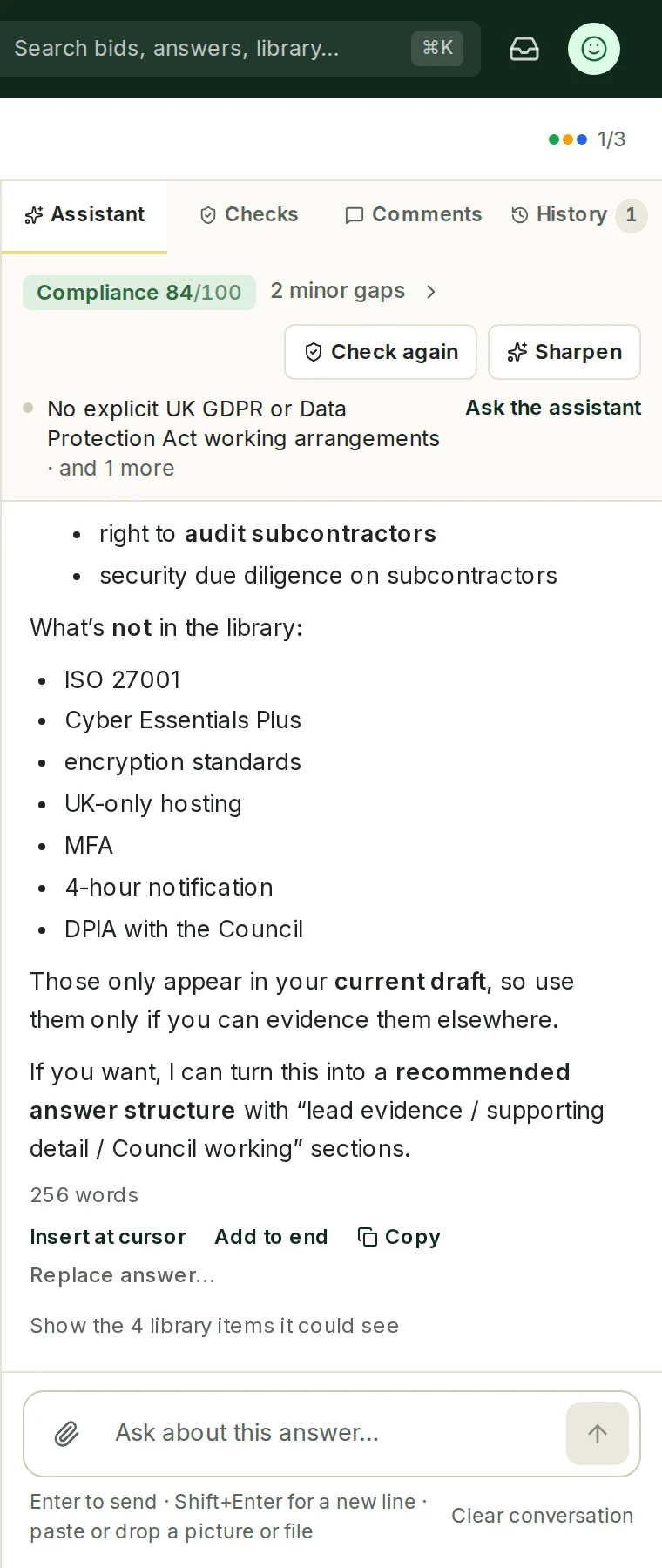
Drafts from your own library, with the sources shown
The assistant reads the question, its limits and scoring, your draft, and your library of past answers, policies and case studies. It tells you which library items it drew on, and it says so when the library does not evidence a claim. It never invents an accreditation.
- Insert a reply at the cursor, or keep writing yourself
- Every AI change is in the history and can be put back
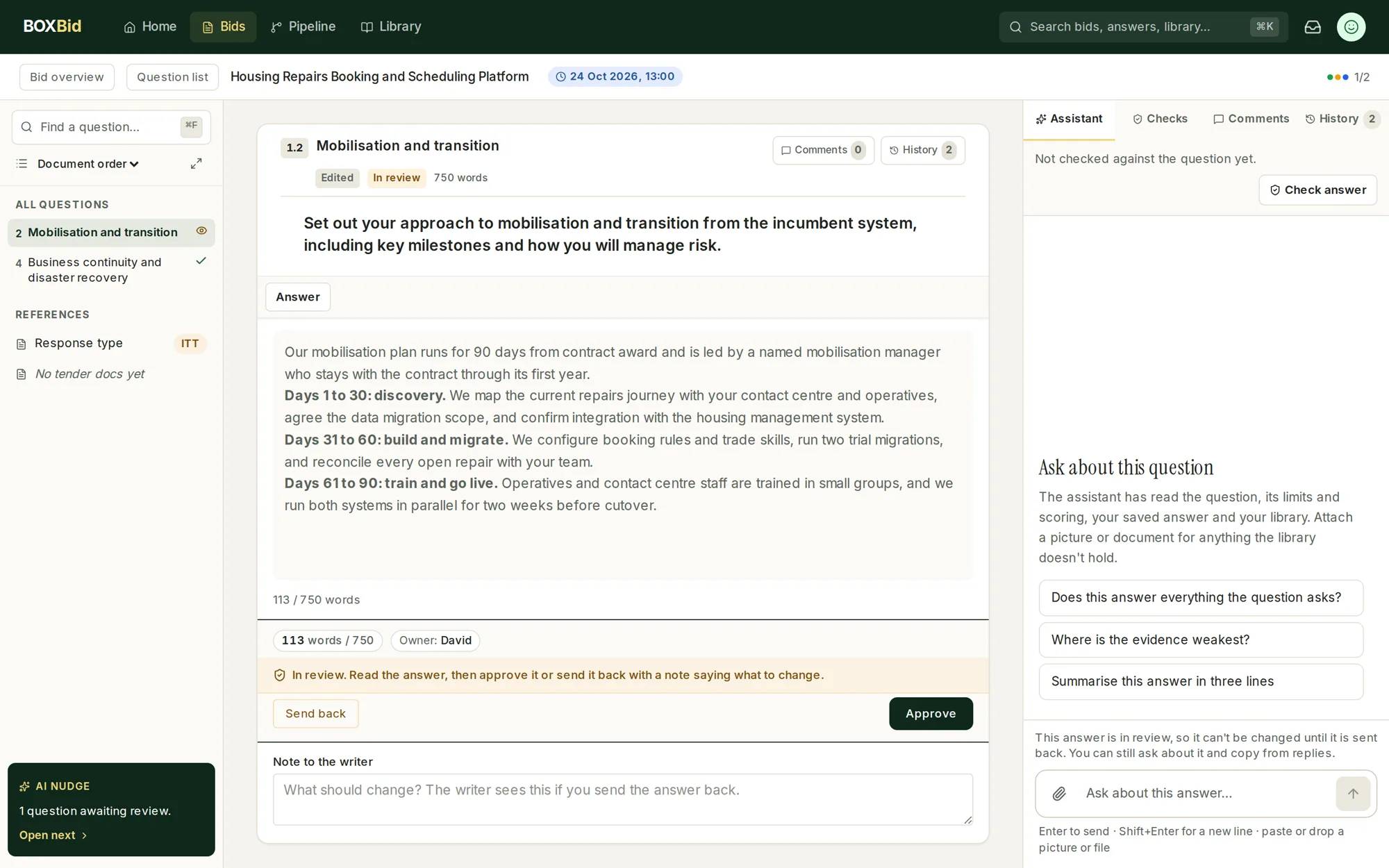
Review that does not happen in email
When a writer sends an answer for review it locks. The reviewer reads it, then approves it or sends it back with a note saying what to change. Nobody edits the wrong version, and the bid owner can see what is still waiting.
- Comments anchor to the words they are about
- Approved answers export to a branded Word document
Also in BOXBid
- Go or no-go, before you commit
- A structured read of the tender: contract value, key dates, evaluation criteria and red flags.
- Gap and compliance checks
- Each answer scored against what the question asks, with what is missing listed as critical, major or minor.
- A library that grows
- Past answers, policies, case studies and accreditations in one searchable place. Each bid adds to it.
- Frameworks and lots
- Choose the lots you are bidding, give each a lead, and run call-offs from the framework they belong to.
- Works with Microsoft 365
- Entra ID sign-in on Growth and above. SharePoint, Jira and Teams on Professional and Enterprise.
- Secure, UK-resident AI
- Your data and AI processing stay in UK regions, on Azure, AWS or your own cloud. Never used for model training.
From tender to approved answers
-
Upload the tender
BOXBid reads it and lists every question with its section number and word limit, plus a summary of the contract, the evaluation criteria and any go or no-go flags. Check and adjust the list before anyone starts writing.
-
Divide up the work
Give each question an owner and a due date. Writers see their questions, reviewers see their queue, and the bid owner sees the whole submission. Microsoft Teams notifications are available on Professional and Enterprise.
-
Write with the assistant
For each question the assistant drafts a starting answer from your library and shows what it used. Check the answer against the question, close the gaps, and tighten the wording, all on one screen.
-
Review and submit
Answers move from Draft to In review to Approved. When everything is approved, export to Word for the buyer’s portal.
A bid passes through many hands. Each of them gets what they need.
- Bid writers and managers
- Draft, sharpen and chase answers day to day, with help on every question and a clear view of progress.
- Subject matter experts
- Get only the questions assigned to them, write the answer, and hand it back without wading through the rest of the bid.
- Directors and reviewers
- Read, challenge and approve answers before submission, with the checks and the history beside each one.
- Bid coordinators
- Run several bids at once: who owns each question, what state it is in, and what is falling behind.
Your content stays yours, in the UK.
Read how we handle security- UK regions
- Storage and AI processing both stay in the UK.
- Never used for training
- Your content is processed only to provide the service to you.
- Cyber Essentials Plus
- Independently audited, not self-assessed.
- BPSS and SC cleared
- A security-cleared team behind the product.
Pricing
Every plan starts with a 30-day free trial. No card needed. Prices exclude VAT.
Starter
£99 a month
Small bid teams getting started.
- Up to 5 users
- 5 new bids a month
- 500 AI calls a month
- Knowledge library
- Word export
- Email support
Growth
£349 a month
Teams bidding regularly.
- Up to 20 users
- 20 new bids a month
- 2,500 AI calls a month
- Everything in Starter
- Microsoft Entra ID sign-in
- Priority support
Professional
£799 a month
High-volume teams needing the full platform.
- Up to 50 users
- Unlimited bids
- 10,000 AI calls a month
- Everything in Growth
- Jira and SharePoint
- Microsoft Teams notifications
- Bring your own AI backend
Enterprise
Custom
Dedicated deployment with full BOX3 support.
- Unlimited users
- Unlimited bids
- Unlimited AI calls
- Everything in Professional
- Dedicated tenant deployment
- Onboarding and professional services
- Custom SLA
Book a demo
Tell us about your team and we’ll reply within one working day.
Thanks, we’ve got it.
We’ll reply within one working day.